Designing an AI lesson planner
Helping 250 Teach For India Fellows plan faster while still writing their own plans
Writing the plan wasn’t the main problem
Fellows asked for an AI that writes their lesson plans. They were first- and second-year teachers in government schools, with 35 to 40 students at mixed levels, planning at night from the textbook.
Fellows were happy for AI to do more of the work, as long as they still made the decisions.What we learned from 10 interviews
How might AI take on the planning, while the teacher still does the thinking?
An AI that suggests
A template can’t read 38 quick checks overnight, and an AI that writes the whole plan leaves the teacher nothing to think about. So Edequity reads the class data and suggests ideas, and the teacher decides what goes in.
chosen
Research before any screens
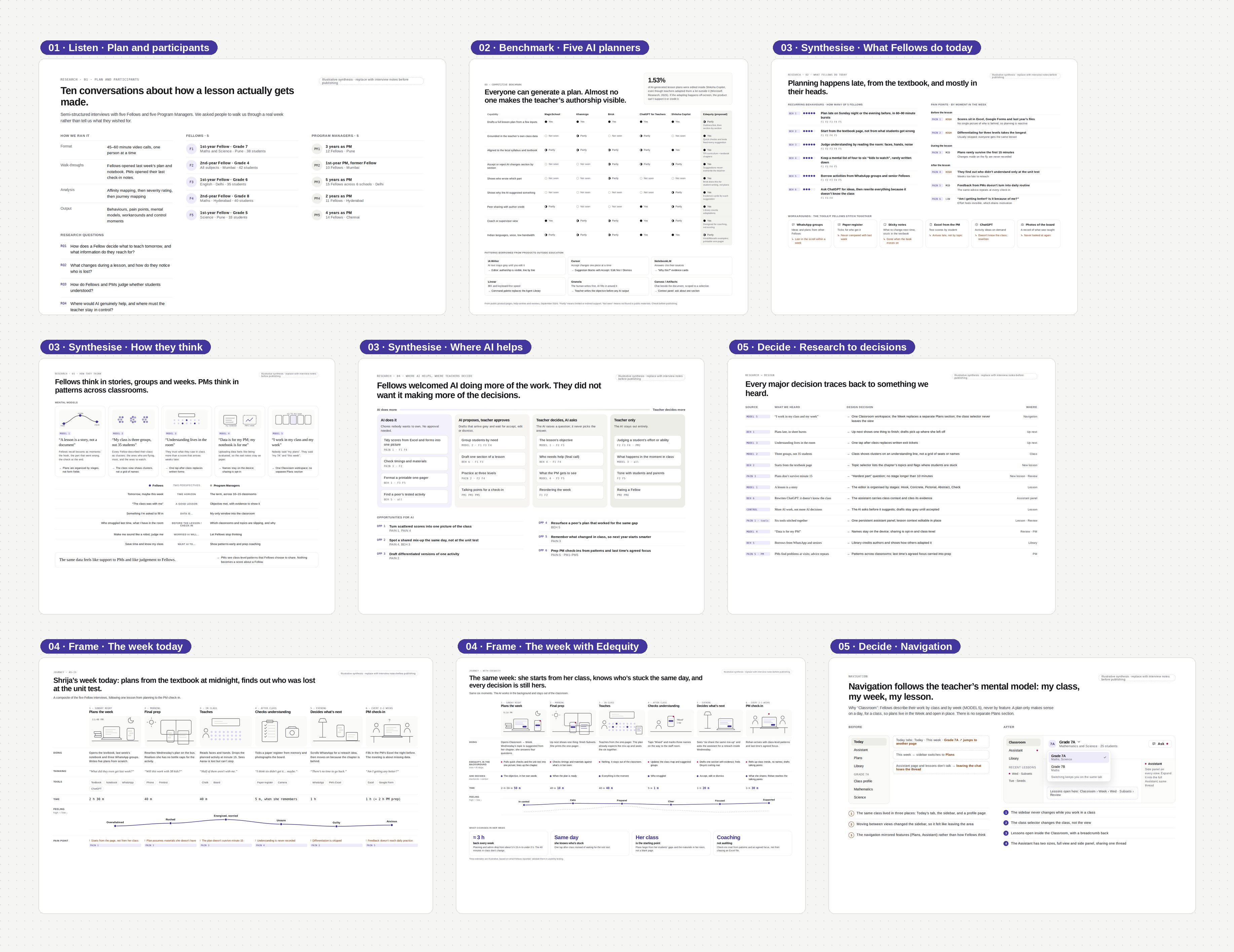
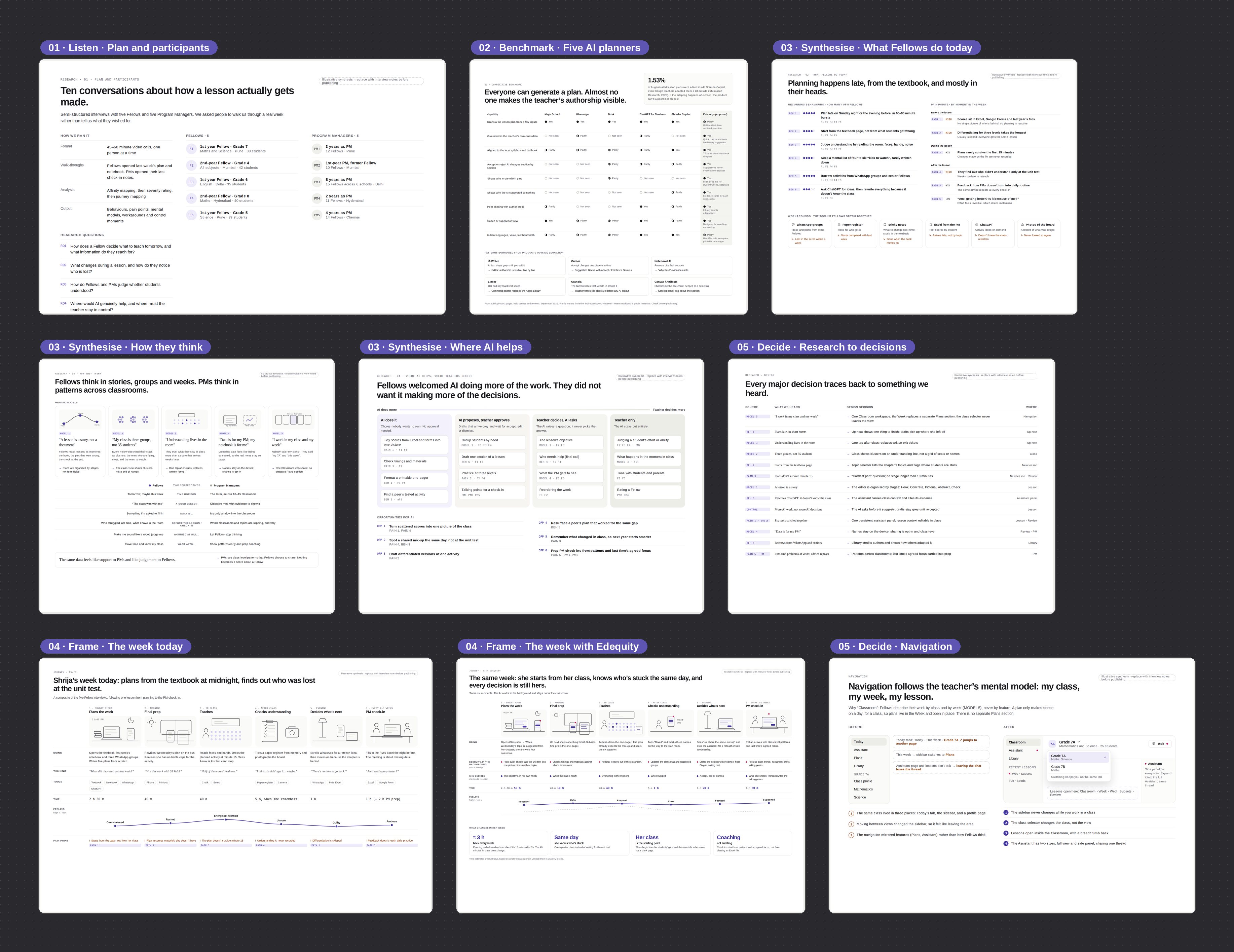
How Fellows think about planning
They remember a lesson by how it opened, where kids went wrong, and the check at the end.
Kids who are ahead, most of the class, and a few who need help.
They trust what they saw in class more than a test score weeks later.
They worry uploaded data will be used to judge them.
Nobody said “my plans”. They said “my 7A” and “this week”.
Turning the insights into design principles
Class insight as the starting point
Built on Models 02, 03, 05Surfacing what to do next
The home screen shows one plan to finish, today’s lessons, and at most two things that need attention, like six students stuck on the same topic. The Fellow doesn’t have to ask for anything or set anything up.
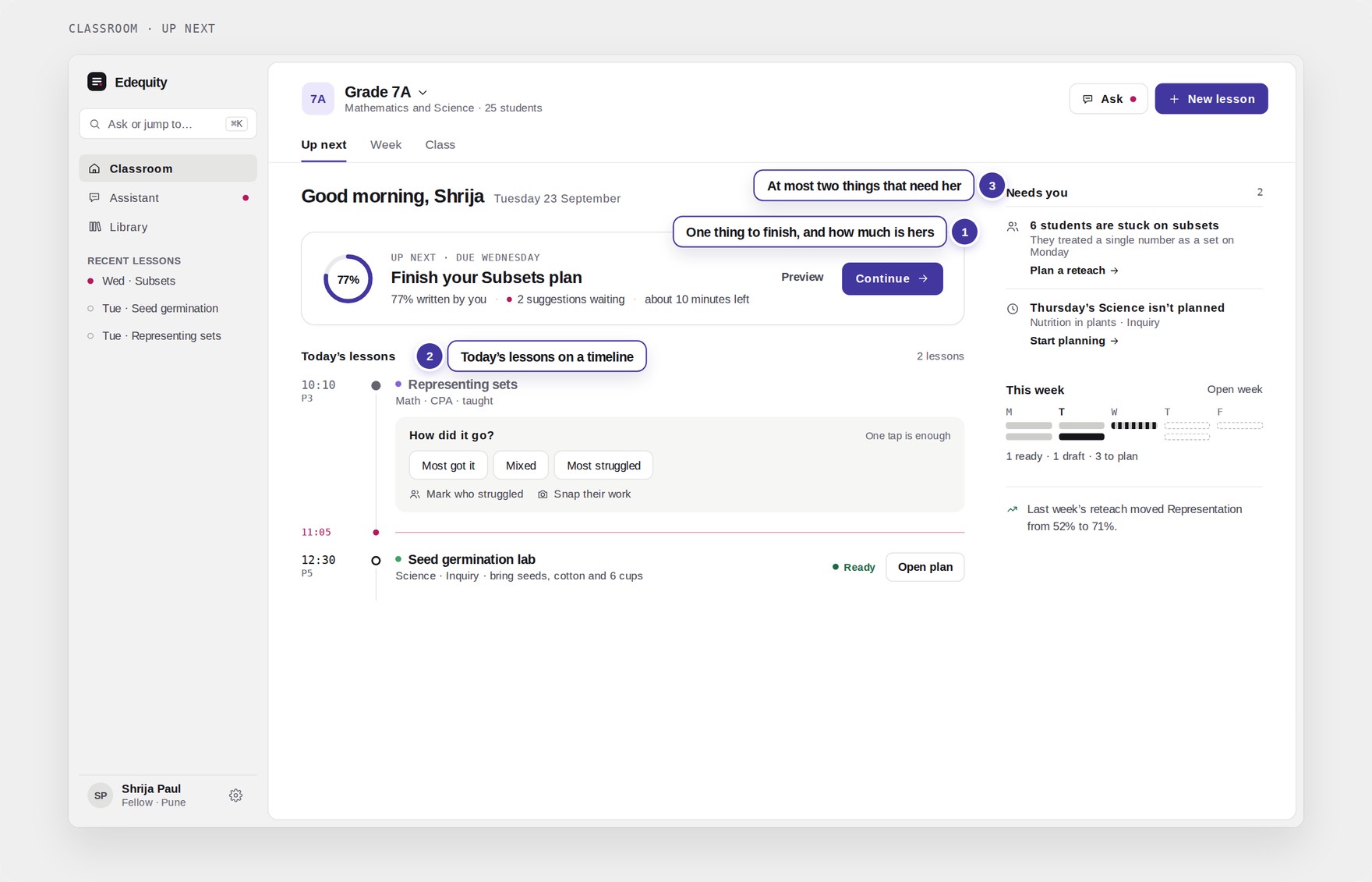 Classroom · Up next
Replacing forms with one question
The only record of a lesson used to be a paper register. Now there’s one question after class: how did it go? A teacher answers in one tap and can mark who struggled on the way out.
Showing the class as groups instead of rows
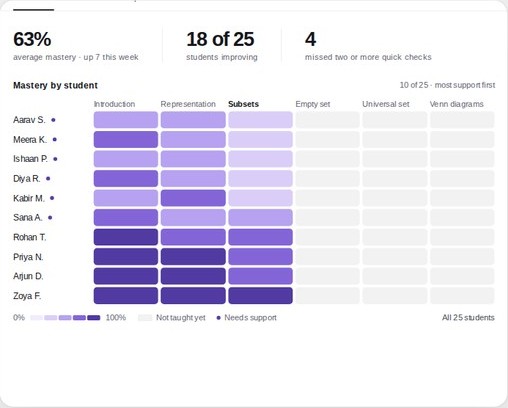
A heatmap was accurate but slow to read. A seating chart felt friendly, but classrooms don’t have fixed seats. The final version places each student as a circle on a line from “not yet” to “got it,” so students who share a misconception show up together.
Planning a lesson
Built on Model 01Setting lesson context without a setup flow
Setting up a lesson used to take 14 steps. Now class, subject, topic, length and date are dropdowns at the top. The topic list comes from the textbook chapter and notes where students are struggling.
Following TFI’s planning order
There are four questions, in the order TFI trains Fellows to plan: why this matters, what students should be able to do, how you’ll know they got it, and what will be hardest. The Fellow’s answers become the base of the plan.
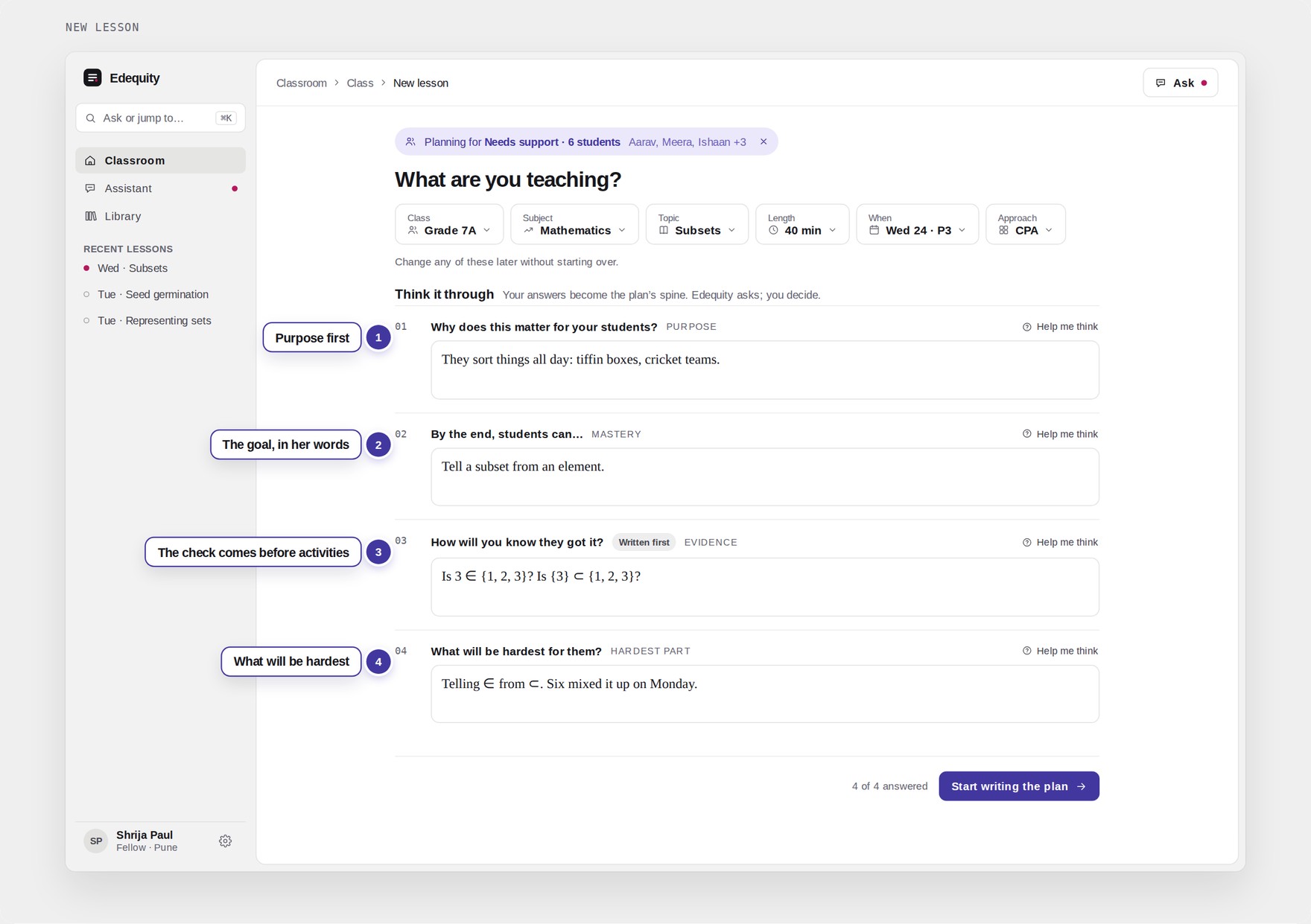 New lesson
Letting the AI ask before it suggests
The AI doesn’t jump straight to activities. It might notice that all six mistakes involved a single number, and ask whether the hands-on part should keep single objects and groups apart. The idea is still the Fellow’s.
Loading states say what the AI is doing
These are the product’s own loading states. Each one names its step, so a Fellow planning at night knows whether to wait or keep typing.
Keeping the teacher in charge of the plan
Built on Model 01: the interviewsWho does what
The Fellow sets the goal and makes the decisions. Edequity reads the class data and drafts suggestions.
Suggestions that stay grey until the Fellow decides
Suggestions appear in grey inside the plan, one section at a time. The Fellow can accept, edit or dismiss them, and whatever they edit turns black. A meter shows how much of the plan they wrote, and accepting a suggestion lowers it.
Every group draws their bag of bottle caps on chart paper.
Loose caps become dots and the pouch becomes a small circle inside. Then write Monday’s answer, 2 ⊂ {1, 2}, on the board and ask: is 2 a dot or a circle? Meera’s table answers first.
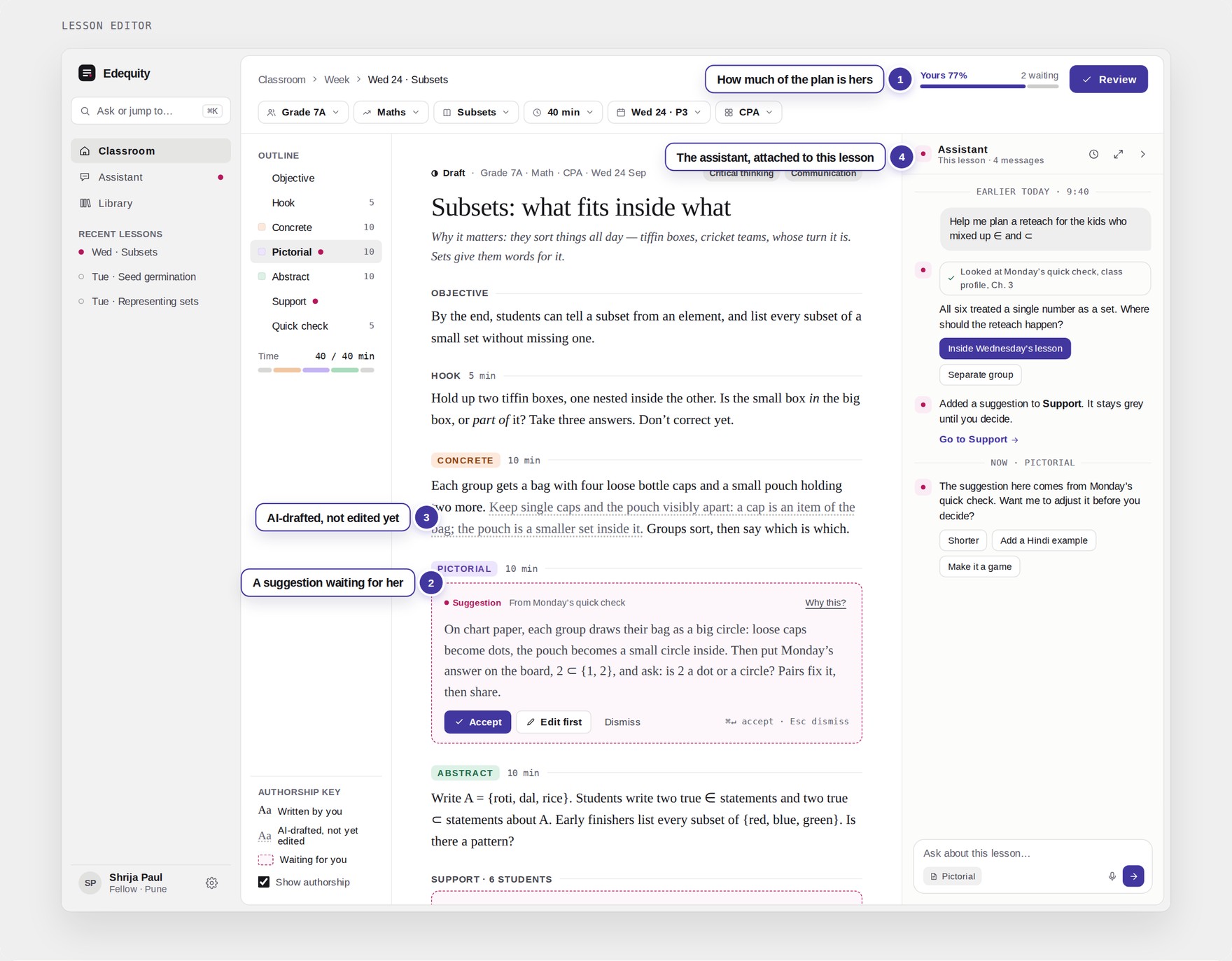 Lesson editor
Showing why each suggestion exists
Every suggestion shows where it came from: the class data, the Fellow’s own answer, the materials they have, or the textbook page. They can judge a suggestion by its source.
When it’s wrong
Any suggestion can be undone in one tap, and the Fellow can always see why it’s there.
One conversation across the product
If a Fellow leaves a chat, it’s still there later. The assistant has a full view and a side panel next to the plan, and both use the same conversation, saved with the lesson.
Grey until the Fellow accepts or edits it
Every suggestion has the same three options. Accepting takes one tap, and so does undoing it.
Built on TFI’s pedagogy
Built on The six frameworksThe frameworks, visible in the interface
Most of these decisions come from how TFI already teaches: concrete materials before symbols, writing the check before the activities, starting with purpose, the 8Cs, grouping for mixed levels, and using what’s in the room.
Rules the AI follows
Written into every prompt, and tested before rollout.
- 01Never writes a whole planOne section at a time, always grey until the Fellow decides
- 02Always shows its sourceClass data, the Fellow’s answers, their materials or the textbook
- 03Asks before it suggestsOne question with a yes or no answer
- 04Only uses what’s in the roomNothing the Fellow would have to buy
- 05Never names a student to a PMProgram Managers only see class patterns
For Program Managers
Built on Model 04PMs only see class-level patterns
PMs see class-level patterns that Fellows choose to share, with no student names and no scores about the Fellow. Check-ins start from what they agreed on last time.
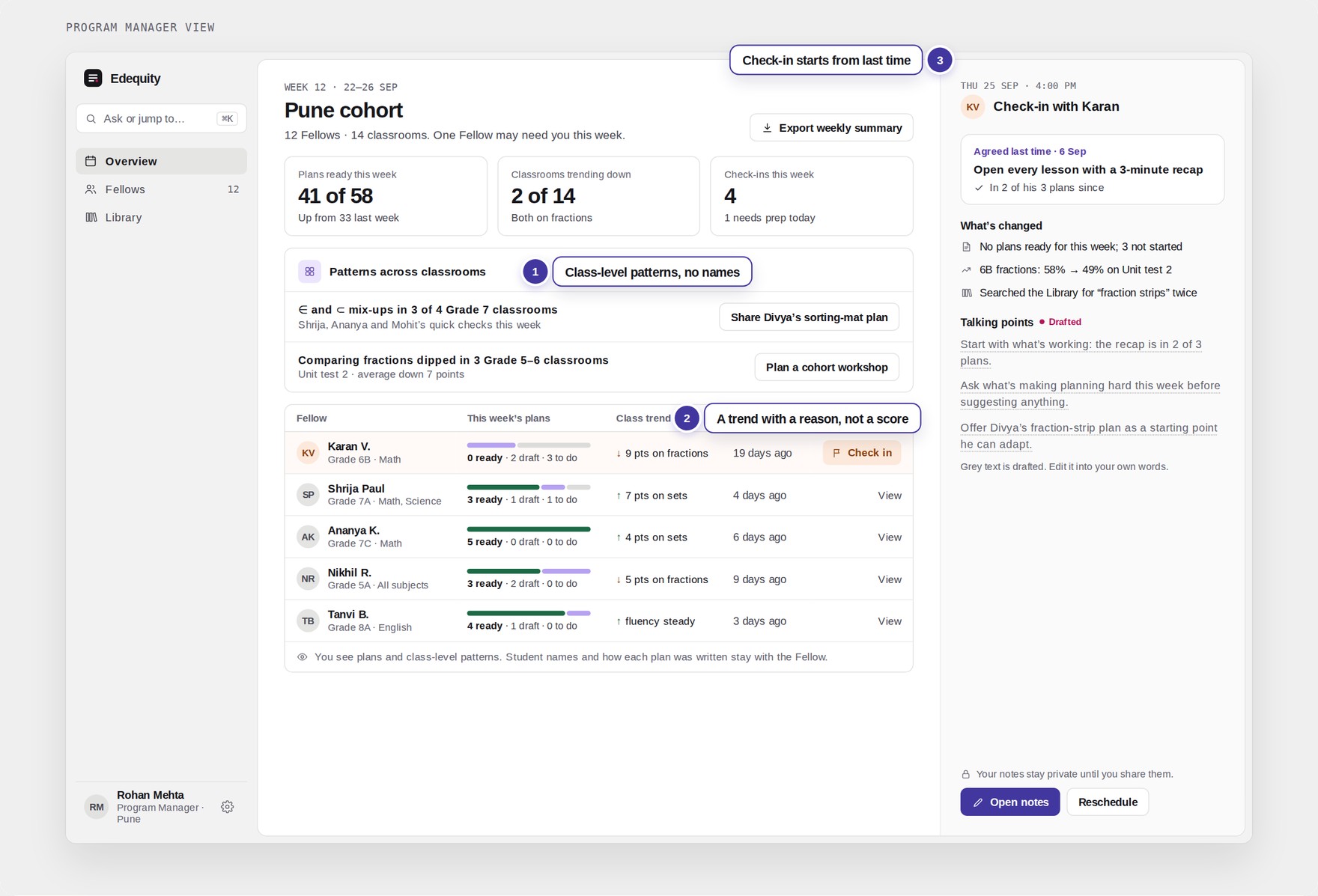 Program Manager view
What changed for Fellows
The build on Claude was handed off, built by engineering and rolled out across the programme. These are the numbers after rollout.
Class, subject, topic, length and date. The topic list comes from the textbook, so nothing is typed from memory.
How I prompted the design on Claude
Claude Design for the screens, Claude Code for a build people could use. I went back and forth between the two, with stakeholder reviews in between.
The research came before any prompting. I didn’t start prototyping with AI until the interviews, the mental models and the principles were done, so the AI worked from what we’d already figured out.